








Samsung Galaxy S26 FE 8GB 256GB


All specifications and descriptions provided herein may be different from the actual specifications and descriptions for the product. Samsung reserves the right to make changes to this document and the product described herein, at any time, without obligation on Samsung to provide notification of such change. All functionality, features, specifications, GUI and other product information provided in this document including, but not limited to, the benefits, design, pricing, components, performance, availability and capabilities of the product are subject to change without notice or obligation. The contents within the screen are simulated images and are for demonstration purposes only. *Availability of Galaxy AI features may vary depending on the region/country, OS/One UI version, device model and phone carrier.

Welcome to Galaxy S.
Time to upgrade your Galaxy. Next-gen Galaxy AI simplifies your daily tasks, while more powerful performance and an extended battery keep you ready for whatever comes next. Enjoy your favorite content on a stunning display and capture high-resolution photos with an advanced camera system. Everything you need, everything you want — all in one incredible device.
See the highlights

Center your favorite.

DESIGN
Essential design to frame your everyday.
Galaxy S26 FE combines a slim, premium design with durable materials and the iconic Galaxy silhouette. Clean lines, balanced proportions, and a refined finish create a sleek look, with strong construction built for everyday reliability. It's a design that balances durability and modern style for those who value both what lasts and what's new.

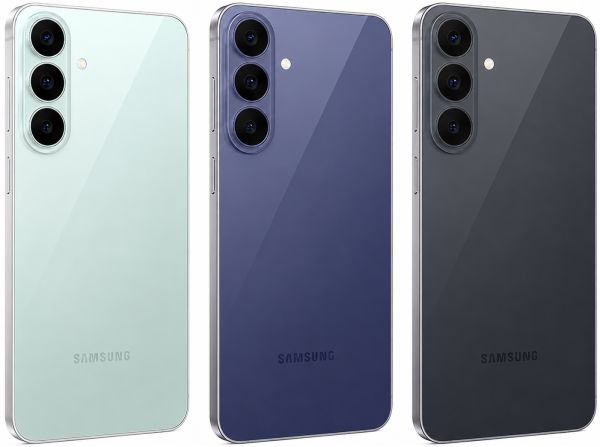
Pick your signature shade.
Galaxy S26 FE comes in three distinctive colors, each thoughtfully selected to complement your everyday life. From the understated confidence of Graphite to the fresh energy of Pistachio and the vibrant character of Blueberry, each shade reflects its own unique vibe. Find your signature color and let it match your style.

Pistachio
Color availability may vary depending on country/region or carrier.

Looks sleek, built tough.
Galaxy S26 FE pairs a slim, comfortable design with dependable protection for everyday adventures. Encased in Corning Gorilla Glass Victus+ and an aluminum alloy frame, it combines a refined look and feel with a build made to last. An IP68 rating for dust and water resistance gives you added confidence wherever the day takes you.

Back glass does not include camera glass. Frame does not include volume and side keys or SIM tray.
Galaxy S26 FE is rated as IP68. Based on lab test conditions for submersion in up to 1.5 meters of freshwater for up to 30 minutes and for protection against a solid object greater than 1 mm such as a wire. Not advised for beach or pool use. Water resistance of device is not permanent and may diminish over time due to normal wear and tear.
CAMERA
Check out our camera specs.

Close-up of the Triple Camera system on the back of Galaxy S26 FE in Pistachio with the Triple Camera lenses falling into place on the camera bump and a close-up of the Front Camera. Galaxy S26 FE is equipped with a 12 MP Ultra Wide Camera, 50 MP Wide-angle Camera and 8 MP Telephoto Camera on the back, and a 12 MP Selfie Camera.
PROVISUAL ENGINE
Every moment, captured in ProVisual detail.
Capture clear, high-resolution photos and videos from the moment you shoot to the moment you look back on them. Powered by ProVisual Engine, Galaxy S26 FE enhances image quality and preserves detail across a wide range of shooting situations. Make every shot count with sharp detail, vibrant color, and true-to-life clarity — with less effort.

Results may vary depending on light condition and/or shooting conditions including multiple subjects, being out of focus or moving subjects.
Photos shown are simulated for illustrative purposes only and are not captured with Galaxy S26 FE.
NIGHTOGRAPHY
Nights to meet you.
Some of the best moments happen after sunset. Galaxy S26 FE helps keep photos and videos clear and bright in low-light environments, reducing noise while preserving the details that make nighttime memories worth sharing.

Results may vary depending on light condition and/or shooting conditions including multiple subjects, being out of focus or moving subjects.
Photos shown are simulated for illustrative purposes only and are not captured with Galaxy S26 FE.
Contains an AI-generated image with post-editing applied.
ZOOM
Close. Closer. Whoa.
A closer look reveals more. 50 MP Zoom technology helps preserve sharp details when you zoom in, so the textures, colors, and intricate elements that caught your eye remain clear in the shot. Sometimes it's the details that leave the biggest impression.

Photos shown are simulated for illustrative purposes only and are not captured with Galaxy S26 FE.
Optical quality zoom is enabled by the Adaptive Pixel sensor. 3x distance is optical zoom. 2x distance is optical quality zoom.
Photos shown are simulated for illustrative purposes only and are not captured with Galaxy S26 FE.
SELFIE
Fit more into every selfie.
Trying to fit everyone into the selfie? The upgraded 12 MP selfie camera gives you a little more room, so your friends and the view behind you can all fit comfortably in the shot. No one gets left out this time.

Results may vary depending on shooting conditions including multiple subjects, being out of focus or moving subjects.
Photos shown are simulated for illustrative purposes only and are not captured with Galaxy S26 FE.
SUPER STEADY VIDEO
Super Steady Video. Now steadier.
Super Steady Video’s expanded optical angles together with gyro and acceleration sensors recognize the direction of gravity and keep your shots level, even if you rotate a full 360°. Whether you're on rocky trails or chasing your fastest finish, get smoother, shake-free videos every time.

Super Steady Video results may vary depending on editing method and/or shooting conditions.
Photos shown are simulated for illustrative purposes only and are not captured with Galaxy S26 FE.


MY FANCAM
Center your favorite.
Get everyone in the shot at an event or a gathering with friends and then put the spotlight on one person later with Galaxy AI. On Galaxy S26 FE's main screen, change wide-angle shots into subject-centered tracking shots cropped to your choice of aspect ratio for easier, more precise edits right from your Gallery.

Three musicians perform on an outdoor stage. Followed by detection boxes around all three performers after the prompt says 'Select someone to follow.' The lead singer is selected. The edited video becomes a subject-centered tracking shot that follows the singer on Galaxy S26 FE.
My FanCam feature requires a Samsung Account login. Availability may vary by video. Not supported if there is no subject to track.
Samsung does not make any promises, assurances or guarantees as to the accuracy, completeness or reliability of the output provided by AI features.
Galaxy AI basic features provided by Samsung are free. Future releases may include enhanced features or new services that are offered on a paid basis. Different terms may apply for AI features provided by third parties.
Galaxy AI basic features are those services listed under "Advanced intelligence" in the current Samsung Services Terms and Conditions.
Contains AI-generated images with edits.
AUDIO ERASER
Instant audio control during video playback.
Fine-tune audio and hear more of what you want, even over the noise outside. From livestreams to recorded content on social media, Audio Eraser helps reduce unwanted background noise, so voices and other important sounds come through more clearly.

*Audio eraser results may vary per video depending on how sounds present in the video. Samsung Account login required. Certain types of sound can be detected, such as voices, music, wind, nature, crowds and noise. Compatible with common video/audio formats accessible in Gallery, Samsung Notes, Video Player, Voice Recorder, and call transcription. The actual sound detection may vary depending on audio source, and the condition of the video.
*Noise from media playing can also be adjusted through the Quick panel for some apps.
*Samsung does not make any promises, assurances or guarantees as to the accuracy, completeness or reliability of the output provided by AI features.
*Galaxy AI basic features provided by Samsung are free. Future releases may include enhanced features or new services that are offered on a paid basis. Different terms may apply for AI features provided by third parties. Galaxy AI basic features are those services listed under "Advanced intelligence" in the current Samsung Services Terms and Conditions.
PHOTO ASSIST
Photo editing, in your own words.
Photo Assist turns your imagination into reality. Simply describe what you want to see and create visuals from your words and image references — no need for complex editing tools. Whether you're exploring creative concepts, personalizing content, or bringing an idea to life, it's an easy way to create in seconds.

A photo of a woman posing with city skyscrapers in the background during the day is selected from the Gallery on Galaxy S26 FE. Text reads, Describe what to change. Make it a dramatic night scene is typed into the prompt. The Generate button is pressed, transforming the photo into a nighttime scene.
Photo Assist may require a network connection and Samsung Account login. Service availability may vary by country, language or device model. Photo Assist may result in a resized photo. A visible watermark is overlaid on the image output upon saving in order to indicate that the image is generated by AI.
*Samsung does not make any promises, assurances or guarantees as to the accuracy, completeness or reliability of the output provided by AI features.
Galaxy AI basic features provided by Samsung are free. Future releases may include enhanced features or new services that are offered on a paid basis. Different terms may apply for AI features provided by third parties. Galaxy AI basic features are those services listed under "Advanced intelligence" in the current Samsung Services Terms and Conditions.
Image simulated.
DOCUMENT SCAN
Built-in scanning made simple.
Scan documents and keepsakes without needing additional apps. Document Scan helps reduce distractions such as fingers in the frame and folded corners, while Multi Scan captures multiple items at once. Whether you're saving a concert ticket, collecting travel memories, or sharing an event on social media, it's an easy way to create clean, share-ready scans in just a few taps.

Document area within the camera screen must be greater than 20%. If the document contains only images without text, it may not be recognized as a document in Photo Mode. Original document must be rectangular. All four corners of the document must be visible within the camera screen without any obstructions. Capture angle must be within 20 degrees after setting to 0 degrees when the document surface and the camera are level. Correction for folding is possible within two turns and between 130 and 180 degrees. For warped documents, the document must be placed on the floor with a uniformly short-axis angle of A4 size, with a distance of less than 4 cm between the floor and the document. Traces may remain after shadow removal for documents with strong shadows or colors. A gap greater than 0.8 cm between objects (text, tables, images, etc.) and obstructions (fingers, folded edges) must be present. Not supported if the object and obstacle are not separated or overlap. Moiré removal restrictions may result in residual moiré in cases of very strong moiré. Document-specific filters may produce unintended results when applied to scenes where the document is not visible. Available Saved File format is JPEG or PDF. Available Multi-Scan Image Import Input File Format is JPEG, HEIC, PNG, BMP, WebP or GIF. Available Gallery Scan Input File Format is JPEG or HEIF (JPG, HEIC). Usage may be limited in certain temperatures.
*Multi-Scan supports up to 350 pages per scan session on devices running One UI 9 or later. Available Multi-Scan Image Import Input File Formats are JPEG, HEIC, PNG, BMP, WebP, and GIF.
ONE UI 9
Your Galaxy. Your way.
The new One UI 9 is capable of doing much more — from taking care of tedious tasks to suggesting what I need at the exact moment to adapting to my personal tastes and usage patterns. With AI integrated deeper into the system, you now have the freedom to be more productive and creative. Experience seamless intelligence of your Galaxy that empowers you to see more, create more and understand more.

Contains an AI-generated image with post-editing applied.
KNOX PRIVACY
Your privacy. Secured.
We’re committed to protecting your information, while providing transparency about how it’s used and shared.

*
The Personal Data Engine functions under the condition that the Personal Data Intelligence menu is on. Analyzed data will be deleted once the Personal Data Intelligence menu is turned off. Personal Data Engine recognizes select languages and certain accents/dialects, including but not limited to Arabic, (Simplified) Chinese, Dutch, English, French, German, Hindi, Indonesian, Italian, Japanese, Korean, Polish, Portuguese, Romanian, Russian, Spanish, Swedish, Thai, Turkish, and Vietnamese. Personal Data Engine currently analyzes Samsung native applications and supported app notifications.
*KEEP is available on Galaxy smartphones and tablets with One UI 8 or later.
On-device Protection
Our Personal Data Engine gathers and processes your personal data safely. Then it encrypts that data and saves it onto your device with KEEP and Knox Vault, making it harder for anyone else to gain access.
Tailored Controls
Take control over your Galaxy AI. You decide where it gets processed, either on-device or in the cloud.
Connected Security
Knox Matrix Trust Chain technology provides security across Galaxy connected devices so you can monitor the security of other devices right from your Galaxy smartphone.
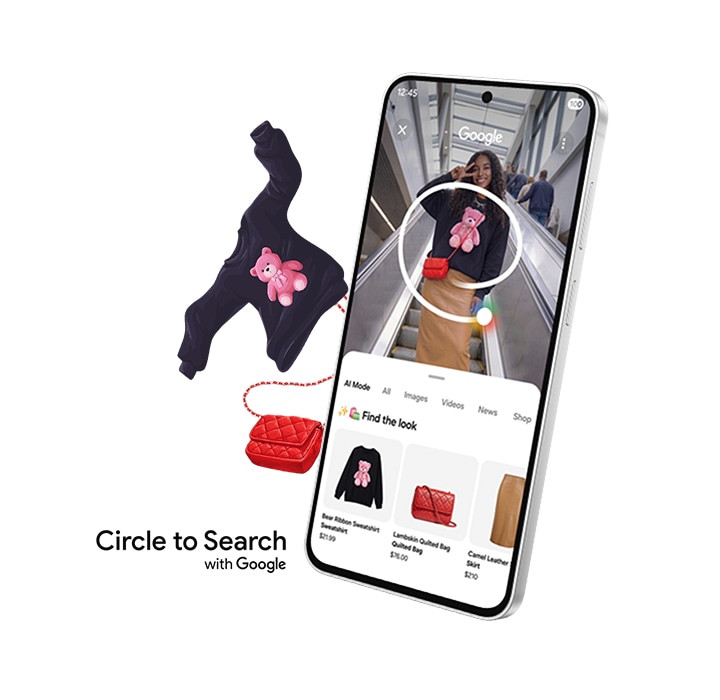
Circle it, find it.
Use Circle to Search with Google to find multiple items of a look by simply circling an outfit on your screen, and it will help you find every piece — from tops to footwear and everything in between — all in one search. You can circle it, search it and find the look, all from exactly where you are.
*Google is a trademark of Google LLC. Sequences shortened and simulated. Results for illustrative purposes only. Service availability may vary by country, language, device model. Available on select devices and internet connection required. Works on compatible apps and surfaces. Results may vary depending on visual matches. Users may need to update Android and Google app to the latest version. Accuracy of results is not guaranteed.
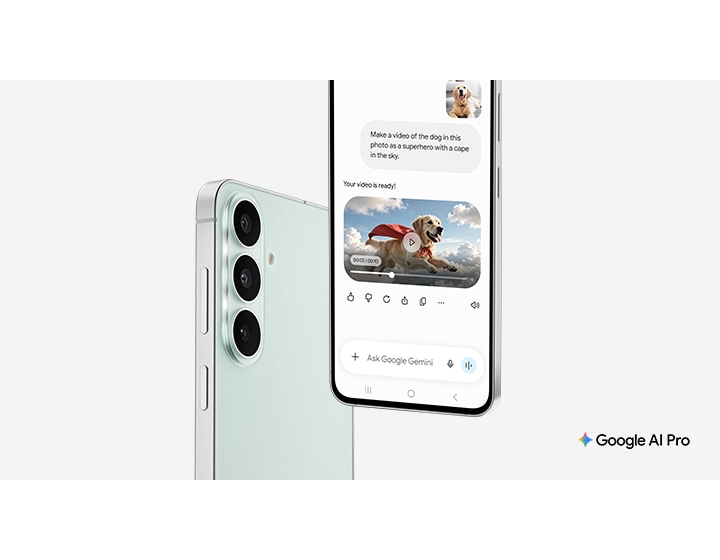
Get a 6-month trial on us
with Gemini Omni, making it easy to create videos from just an image and a prompt, plus 5 TB of secure cloud storage.
*Image shortened and simulated. Results for illustrative purposes and may vary. Check responses for accuracy. Gemini is AI and can make mistakes. Gemini is a trademark of Google LLC. Terms apply. By subscribing, you agree to terms for Google One, YouTube and offers. Offer ends Aug 1, 2027 at 11:59 pm PT. Unless canceled earlier, Google One will charge $19.99.mo after the trial ends. Cancel anytime. Return of purchased device may result in cancellation of subscription. See full terms at https://one.google.com/offer/terms-and-conditions/SamsungAIPro
PERFORMANCE
Vibrant display for immersive viewing.
Enjoy your favorite content on a large 6.7-inch FHD+ display designed for immersive viewing. With a 120 Hz refresh rate, scrolling, streaming and everyday interactions feel smooth and responsive. From stunning natural landscapes and travel videos to photos and everyday entertainment, vivid colors and detailed visuals make every experience more engaging.

Measured diagonally, the screen size is 6.7" | 171.1 mm in the full rectangle and 6.6" | 166.4 mm accounting for the rounded corners. Actual viewable area is less due to the rounded corners and the camera hole.
Charge fast. Play more.
Built to go the distance, the 4,900 mAh battery keeps you going strong, whether you're tackling a busy day or unwinding with your favorite content. With up to 29 hours of video playback on a single charge, Galaxy S26 FE lets you stay immersed in the content you love.

Actual battery life may vary depending on network environment, app usage, feature settings, call and message frequency, charging habits and other factors. The rated capacity of Galaxy S26 FE is 4,755 mAh.


Turbocharged processing speed.
Built with an advanced processor engineered for speed, responsiveness and efficiency, Galaxy S26 FE helps you stay productive, creative and connected throughout the day. Powerful CPU, GPU and NPU performance help accelerate everything from multitasking to content creation, while optimized processing keeps everyday experiences running smoothly.

Galaxy S26 FE's customised chip is seen with NPU, GPU, and CPU.
Performance may vary depending on game optimization, app usage and device settings. Cooling efficiency depends on environmental conditions and usage intensity.
AP performance improvements apply to Galaxy S26 FE and are compared to Galaxy S25 FE. Actual performance will depend on user environment, conditions and pre-installed software and applications.


Stay connected at ultra-high speeds.
Stay connected at ultra-high speeds with Qualcomm® FastConnect™ 7800 Mobile Connectivity System, so when inspiration strikes, you're ready to act on it. Fast, reliable wireless connectivity keeps you connected to what's happening now. Be there when the next big thing happens.

Image simulated for illustrative purposes.
Qualcomm branded products are products of Qualcomm Technologies, Inc. and/or its subsidiaries.
GALAXY ECOSYSTEM
Better together with Galaxy.
Sync Galaxy S26 FE with other Samsung devices in the Galaxy for smart, connected living.

Galaxy Watch9

Galaxy Buds4

Magnet Case
WHY SWITCH TO GALAXY
Switch. Easier.
Imagine where our most powerful devices could take you. Switch to Galaxy and discover a world where all of your technology works together seamlessly, keeping you connected and in control.

Data transfer from iOS to Galaxy through the upgraded method is available when the Galaxy device runs Android 17 or later and One UI 9 or later, and the iOS device runs iOS 26.6 or later.

Quick Share
Quick Share feature lets you instantly send photos, videos and files to nearby Samsung Galaxy devices without cables or apps. Quick Share now supports AirDrop, letting you share content seamlessly and securely with friends, family or colleagues — making collaboration and sharing faster and easier than ever on your phone.

Make the easy switch
Use Switching experience to transfer data from your old phone to Galaxy S26 FE. With an upgraded switching experience, you can easily transfer data from your old iPhone to your new Galaxy wirelessly by simply scanning a QR code. It quickly and securely moves your contacts, photos, messages and apps from any device in just minutes. This seamless process helps you start enjoying Galaxy S26 FE's powerful features, vibrant display and smooth performance without missing a beat.
Receive an instant discount when you trade in your old device.
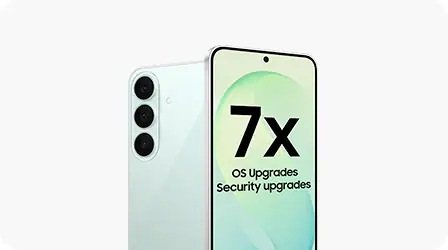
OS Upgrade
Galaxy S26 FE supports up to 7x of OS upgrades and up to 7 years of security updates to keep it running as good as new.
| Brand | Samsung |
|---|---|
| Operating System | Android |
| Screen Size | 6.7" |
| Internal Memory | 256GB |
| RAM | 8GB |
| Main Camera Pixel | 50.0 |
| Dual Sim | Yes |
| Warranty | 1 Year Manufacturer |
| Shipping | Coming Soon |
| Color | Graphite |