







Samsung 49" 144HZ Odyssey OLED G9 G91SD Dual QHD Gaming Monitor (LS49DG910SUXEN)
SKU
U71518
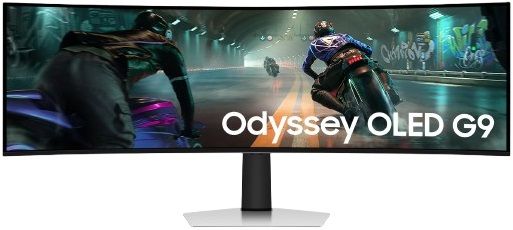

Epic Screen. Epic Play.

Top 4 Features
OLED in Dual QHD
Dazzling color and definition in Dual QHD
VESA DisplayHDR True Black 400
Dive into shadows with purer black levels
144Hz Refresh Rate
Fast-paced action for smooth gameplay
0.03ms Response Time
Blazing speed and near instantaneous reactions
Detailed OLED worlds live on a wider, vibrant screen
OLED in Dual QHD
With OLED technology, enjoy a wider color spectrum and vibrant images that captivate you and take gaming to new heights. Content springs to life on a Dual QHD (5120 x 1440) resolution screen for unparalleled clarity and precision.

Dive into shadows with purer black levels
VESA DisplayHDR True Black 400
Experience true blacks and vibrant colors with no unwanted light leaking across the screen, delivering unmatched depth and clarity in every game.

Outmaneuver opponents with supreme speed
144Hz Refresh Rate & 0.03ms Response Time
OLED technology delivers near-instant reaction times with a 0.03ms response time, paired with a 144Hz refresh rate for ultra-smooth and exhilarating gameplay.
Based on GtG measured under internal test conditions. Results may vary by content and monitor settings.GtG (Gray to Gray) measures the time taken for a monitor pixel to change from one gray value to another. Refresh rate and response time may vary based on the performance of the input source.

Immerse yourself in smooth action
G-Sync Compatible
G-Sync compatibility syncs the GPU and panel to reduce choppiness, screen lag and image tearing. Along with AMD FreeSync Premium Pro, it creates ultra-smooth scenes that let you game with a competitive edge.
Screen images are simulated for illustrative purposes. The application of the G-Sync logo on the package and product may vary depending on the time of purchase.

Win with a wider view and more pixels per inch
32:9 ratio & 110 PPI
Don't sacrifice detail, even with a larger screen. With a wide 32:9 screen in Dual QHD resolution and 110 pixels per inch, you get the level of clarity you need to pick up on the small, but significant, details across the 49" screen.
Screen images are simulated for illustrative purposes.

Samsung OLED Safeguard

A scene from the game Black Desert is on the screen. Behind the screen are dots. Behind the dots is a thermal map, showing warmer colors where the bigger dots and brighter parts of the screen are. As the temperature rises, the brightness automatically decreases, which is also displayed as icons.
Stay cool with automatic brightness control
Thermal Modulation System
Algorithms predict surface temperature and automatically control brightness accordingly to reduce heat.
When the 'Adjust Logo Brightness' setting is set to 'Off' or 'Low', Thermal Modulation is active only in certain picture modes. When the 'Adjust Logo Brightness' setting is set to 'High', Thermal Modulation is always active.

A newscaster sits at a desk, reporting on a breaking news story. A badge saying \"Breaking News\" is in the top right, with a lower third saying \"Legends of Edge Global Glory.\" And they are being highlighted, while its brightness is being reduced.
Adaptive brightness on fixed images
Logo and taskbar detection
The brightness on static images, like logos and taskbars, is automatically reduced to prevent burn-in.
Logo detection is not available in PC mode.
Automatic dimming during gaming breaks
Screen Saver
The screen dims itself after 10 minutes of inactivity, and comes back to regular brightness with any input.
Screen images are simulated for illustrative purposes.
Your Station Your Way

Connect more to enjoy more
Versatile connectivity
Access a variety of input options with HDMI 2.1, Micro HMDI, DisplayPort, USB-C Upstream and Downstream ports. Connect your favorite devices seamlessly, reduce cable clutter and elevate your gaming experience.

Seamless Multitasking with a sub-screen
Picture-in-Picture
The Picture-in-Picture feature eliminates the need for a second monitor by giving you a sub-screen that's perfect for multitasking. Pull up chat windows, gaming tips, or any other content without taking your eyes off your main screen.
Together side-by-side in one screen
Picture-by-Picture
Use your screen to its maximum potential, and team up with friends in a whole new way. Picture-by-Picture splits the screen in half, using two inputs at their native resolution.
Cutting-Edge Design

Extend winning streaks in comfort
Ergonomic Stand
Reach the height of winning. Tilt and adjust your monitor until all enemies are in perfect view. Your display can be moved freely so you can find total gaming comfort.

Stunning in any space
Slim Metal Design
Upgrade your gaming station with razor-sharp design. Featuring a premium and modern metal finish, Odyssey OLED's unmatched design will suit your stylish sense.
| Brand | Samsung |
|---|---|
| Hertz (Hz) | 144Hz |
| Ports | HDMI, DisplayPort, USB Type-C |
| Screen Size | 49" |
| Touchscreen | No |
| Warranty | 2 Years Manufacturer |
| Shipping | Same Day From Lahore |
| Screen Resolution | 5120 x 1440 |